# How to Make a Swipeable Panorama Carousel for Instagram

> The carousel that scrolls like one continuous image. What makes the swipe land, and how to build one on your phone without slicing anything by hand.

You've seen one even if you didn't know it had a name. A photo or illustration that doesn't stop at the edge of the first slide. It keeps going. You swipe, and the picture slides left like a window panning across a wider scene. The horizon lines up across the gap. A person can walk out of one slide and into the next. Nothing jumps.

That's a panorama carousel. It's the most reliable trick we know for getting someone to swipe. A normal carousel just sits there hoping you're curious enough to keep going. A panorama one shows you there's more right at the edge of the first slide, so your thumb does the rest.

Here's how the effect works and how to make one on your phone without the usual hassle.

<video class="post-video" autoplay muted loop playsinline preload="metadata"><source src="/assets/blog/jodu-carousel-demo.mp4" type="video/mp4"></video>
<span class="post-video-cap">A seamless carousel swiping in the Instagram feed.</span>

> **TL;DR** — A panorama (seamless) carousel is one wide image sliced into equal slides that line up as you swipe. In Jodu you design on a single continuous canvas and export perfectly aligned 4:5 slides (up to 20), so there's no manual slicing.

## What a panorama carousel actually is

Instagram lets you post up to 20 images in a single swipeable post. Most people treat those as 20 separate cards. A panorama carousel treats them as **one wide image cut into equal vertical strips**. When Instagram snaps from slide to slide, the strips line back up into one continuous scene.

The whole trick is in the **seams**, the lines where one slide ends and the next starts. Line the artwork up across them and the post feels like one moving image. Be off by a few pixels and it just looks broken. That's the whole game.

The width math is just one slide width times the number of slides:

```text
slide size       = 1080 × 1350 px   (4:5 portrait)
panorama width   = 1080 × N         (N = number of slides, up to 20)

3 slides  → 3240 × 1350 px
5 slides  → 5400 × 1350 px
10 slides → 10800 × 1350 px
20 slides → 21600 × 1350 px   (maximum)
```

Jodu does this bookkeeping for you — you design on the full-width canvas and it exports each 1080-wide strip lined up at the seams.

## Why it's a pain the normal way

Try this in a typical design tool and you'll hit the same wall everyone does. You build one tall, wide artboard, then you slice it into perfectly equal columns by hand, export each one on its own, name them in order, and pray the math worked. One slightly-off slice and your horizon has a step in it. Want to add a fourth slide after you've already laid everything out? Re-slice the whole thing.

The design was never the hard part. The hard part is the bookkeeping. Keeping every strip the same width, in the right order, lined up at every seam. That's the bit a computer should be doing, not you.

## Make the swipe earn its keep

Before the steps, here's the part most tutorials skip. A panorama carousel is really a way to tell a little story. A few things separate the ones people save from the ones they scroll right past.

- **Bleed something off the right edge of slide one.** A hand reaching out of frame, a road running off the edge, half a face. People can't stand an unfinished shape, so they swipe to see the rest of it. That's your hook, and you get it for free.
- **Use the seam as a reveal.** Put a subject so it sits across two slides and the swipe turns into a little moment. The payoff shows up as the next strip slides in. Put the "before" on the first slide and the "after" on the second.
- **Commit to one scene.** Keep the background, colors, and lighting going across the whole width. The continuity is the whole effect. The moment it looks like separate photos taped together, you've lost it.

<!-- SCREENSHOT: annotated single wide canvas showing (a) element bleeding off slide 1, (b) a subject straddling a seam. -->

## Build it in Jodu

We built Jodu's carousel around one long canvas so you never have to slice anything yourself. You design across the full width, and Jodu cuts it into lined-up slides when you export.

<div class="steps">

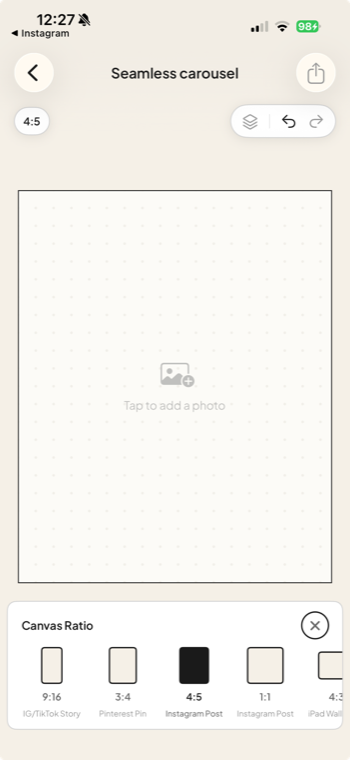
<div class="step"><div class="step-num">1</div><div class="step-text"><p><strong>Start a project and pick Portrait (4:5).</strong> New project, choose the 4:5 canvas. It's the tallest shape Instagram shows in the feed, so it gives your panorama the most height to work with.</p></div><figure class="step-media"><img src="/assets/blog/step-1-canvas-ratio.png" alt="Jodu's Canvas Ratio picker with 4:5 (Instagram Post) selected."></figure></div>

<div class="step"><div class="step-num">2</div><div class="step-text"><p><strong>Add your slides.</strong> You start on a single page. Tap the + on the dots strip at the bottom to add slides. Each dot is one slide, up to 20. Add as many as your scene needs up front, or add them as you go.</p></div><figure class="step-media"><video autoplay muted loop playsinline preload="metadata"><source src="/assets/blog/step-2-add-slides.mp4" type="video/mp4"></video></figure></div>

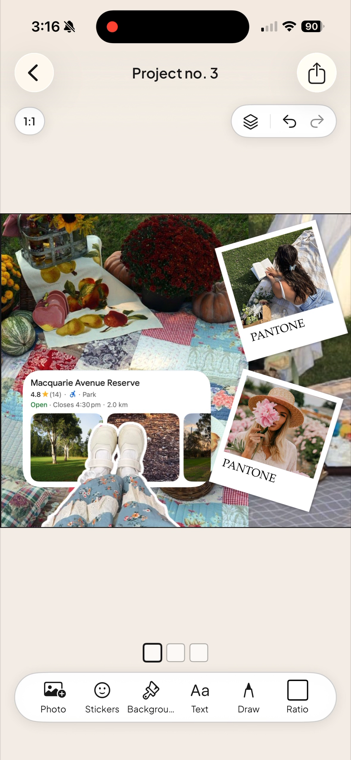
<div class="step"><div class="step-num">3</div><div class="step-text"><p><strong>Design across the whole thing.</strong> Drop in photos, <a href="/blog/remove-photo-background-iphone/">cut-outs</a>, stickers, and text, and scroll the canvas sideways. Drag elements across the slide lines on purpose. That's the seamless part. Smart guides snap to the slide boundaries and to each slide's center, so you can line up to a seam or center something without guessing.</p></div><figure class="step-media"><img src="/assets/blog/step-3-layout.png" alt="A Jodu carousel canvas with a finished collage laid out across it."></figure></div>

<div class="step"><div class="step-num">4</div><div class="step-text"><p><strong>Keep the background continuous.</strong> Backgrounds are set per slide, but a new slide copies the previous one's background by default. So a single color or texture runs right across the whole post unless you change it.</p></div></div>

<div class="step"><div class="step-num">5</div><div class="step-text"><p><strong>A couple of canvas mechanics.</strong> Scrolling locks while a layer is selected, so a drag never turns into an accidental scroll. Tap any dot to deselect and scroll again. And if you drag a layer toward the edge of the screen, the canvas pans on its own so you can carry it into the next slide.</p></div></div>

<div class="step"><div class="step-num">6</div><div class="step-text"><p><strong>Export and check the seams.</strong> Hit export and Jodu renders each slide on its own at up to 3840px on the long edge. That's well past Instagram's 1080px, so it stays sharp after they compress it. You also get a swipeable preview of every slide before you save, which is your last chance to check the seams line up. Then tap Save All to drop them in your camera roll.</p></div><figure class="step-media"><video autoplay muted loop playsinline preload="metadata"><source src="/assets/blog/step-6-export.mp4" type="video/mp4"></video></figure></div>

</div>

## Post it to Instagram

In Instagram, start a new post and tap your slides **in order**, slide one first. Instagram keeps the order you tap them. Because Jodu cut every strip to the same width, the artwork crossing each seam lines up exactly. Keep all of them at the same 4:5 crop, don't let Instagram squish one to square, then write your caption and post.

That's it. The fiddly stuff, equal strips and the right order and lined-up seams, was never something you should've been doing by hand.

<div class="cta-inline"><span class="lead">Ready to make one?</span><a class="btn-download" href="https://apps.apple.com/app/jodu-app/id6759936736" target="_blank" rel="noopener"><svg viewBox="0 0 24 24" aria-hidden="true"><path d="M17.05 12.04c-.03-2.8 2.28-4.15 2.38-4.21-1.3-1.9-3.32-2.16-4.04-2.19-1.72-.17-3.36 1.01-4.23 1.01-.88 0-2.22-.99-3.65-.96-1.88.03-3.61 1.09-4.58 2.77-1.95 3.38-.5 8.39 1.4 11.15.93 1.35 2.04 2.86 3.49 2.81 1.4-.06 1.93-.91 3.63-.91 1.69 0 2.17.91 3.66.88 1.51-.03 2.47-1.38 3.39-2.74 1.07-1.57 1.51-3.09 1.53-3.17-.03-.01-2.94-1.13-2.98-4.44zM14.5 4.07c.76-.93 1.28-2.21 1.14-3.49-1.1.05-2.45.74-3.24 1.66-.71.81-1.33 2.12-1.16 3.37 1.23.1 2.49-.62 3.26-1.54z"/></svg> Download Jodu free</a></div>

## FAQ

### How many slides can an Instagram carousel have?
Up to 20 in a single post. For a panorama, that's also your maximum width: 20 slide-widths of one continuous image.

### What size should Instagram carousel slides be?
Use 4:5 portrait, 1080 × 1350 px. Every slide has to share the same aspect ratio, because Instagram applies the first slide's shape to the whole post.

### How do you make a carousel that scrolls as one image?
Design one wide image and cut it into equal slices, one per slide, so the artwork lines up across the seams. In Jodu you do this on a single continuous canvas and it exports the aligned slides for you.

### Can you make a seamless carousel on a phone?
Yes. Jodu builds the whole thing on one canvas and slices it into aligned slides at export, so you never line up cuts by hand.

<script type="application/ld+json">
{"@context":"https://schema.org","@graph":[
{"@type":"HowTo","name":"How to Make a Swipeable Panorama Carousel for Instagram","description":"Make a seamless panorama carousel that scrolls as one continuous image across Instagram slides, built on one canvas in Jodu.","tool":{"@type":"HowToTool","name":"Jodu"},"step":[
{"@type":"HowToStep","position":1,"name":"Pick Portrait (4:5)","text":"Start a new project and choose the 4:5 canvas, the tallest shape Instagram shows in the feed."},
{"@type":"HowToStep","position":2,"name":"Add your slides","text":"Tap the + on the page-dots strip to add slides, up to 20."},
{"@type":"HowToStep","position":3,"name":"Design across the canvas","text":"Place photos, cut-outs, stickers and text, dragging elements across the slide lines so the picture stays continuous."},
{"@type":"HowToStep","position":4,"name":"Keep the background continuous","text":"Run one background across the whole post so the scene reads as a single image."},
{"@type":"HowToStep","position":5,"name":"Use the canvas tools","text":"Scrolling locks while a layer is selected; drag a layer to the screen edge to auto-pan into the next slide."},
{"@type":"HowToStep","position":6,"name":"Export and post","text":"Export each slide at up to 3840px, Save All to your camera roll, then post the slides to Instagram in order."}
]},
{"@type":"FAQPage","mainEntity":[
{"@type":"Question","name":"How many slides can an Instagram carousel have?","acceptedAnswer":{"@type":"Answer","text":"Up to 20 in a single post. For a panorama, that is also your maximum width: 20 slide-widths of one continuous image."}},
{"@type":"Question","name":"What size should Instagram carousel slides be?","acceptedAnswer":{"@type":"Answer","text":"Use 4:5 portrait, 1080 by 1350 px. Every slide must share the same aspect ratio because Instagram applies the first slide's shape to the whole post."}},
{"@type":"Question","name":"How do you make a carousel that scrolls as one image?","acceptedAnswer":{"@type":"Answer","text":"Design one wide image and cut it into equal slices, one per slide, so the artwork lines up across the seams. In Jodu you do this on a single continuous canvas and it exports the aligned slides."}},
{"@type":"Question","name":"Can you make a seamless carousel on a phone?","acceptedAnswer":{"@type":"Answer","text":"Yes. Jodu builds the whole thing on one canvas and slices it into aligned slides at export, so you never line up cuts by hand."}}
]},
{"@type":"VideoObject","name":"A seamless panorama carousel swiping in the Instagram feed","description":"A finished seamless carousel made in Jodu, swiping across slides as one continuous image in the Instagram feed.","thumbnailUrl":"https://jodu.app/assets/blog/jodu-carousel-demo.jpg","contentUrl":"https://jodu.app/assets/blog/jodu-carousel-demo.mp4","uploadDate":"2026-05-21T08:00:00+00:00","duration":"PT12S"}
]}
</script>

---

*This is part of a 3-part series on seamless carousels. New to the format? Start with [what a seamless carousel is](/blog/seamless-instagram-carousel/). Want the exact pixel specs and grid math? See [dimensions and grid math for seamless carousels](/blog/instagram-carousel-dimensions/).*

---

Source: https://jodu.app/blog/panorama-instagram-carousel/

A free iPhone collage app with a real continuous carousel canvas. Design across one canvas and Jodu exports perfectly aligned slides, no slicing by hand.