# How to Remove a Background from a Photo on iPhone (Free)

> Cut the subject out of any photo on your iPhone in one tap, free and entirely on-device. No background-removal step and no upload.

You don't need Photoshop, and you definitely don't need a website that makes you upload your photo to a stranger's server. Your iPhone can pull the subject out of a photo on its own, in about a second, for free. Here's how, and how to actually use the cutout once you've got it.

> **TL;DR** — iOS can lift a subject right out of the Photos app (long-press the subject, then drag or copy it). To do something with the cutout, like make a sticker, drop it on a new background, or build a collage, open the photo in Jodu: tap it, the subject is isolated on-device, and you can add a border and place it anywhere. Nothing uploads.

## The quick way: lift a subject in Photos

If you just want the cutout and nothing else, iOS has this built in (iOS 16 and later). Open the photo in the Photos app, press and hold on the subject for a second, and it pops out with a glowing outline. From there you can drag it into a message or tap Copy and paste it somewhere else.

It's genuinely handy for a one-off. Where it runs out of road is when you want to actually *do* something with the cutout: put it on a new background, turn it into a sticker with a white border, or combine a few cutouts into one image. Photos won't help you there.

## The better way for anything creative: Jodu

Cutting a subject out, giving it a clean border, and dropping it onto a new background usually takes two or three different apps. In Jodu it's all in one place, and it's quick.

<div class="steps">

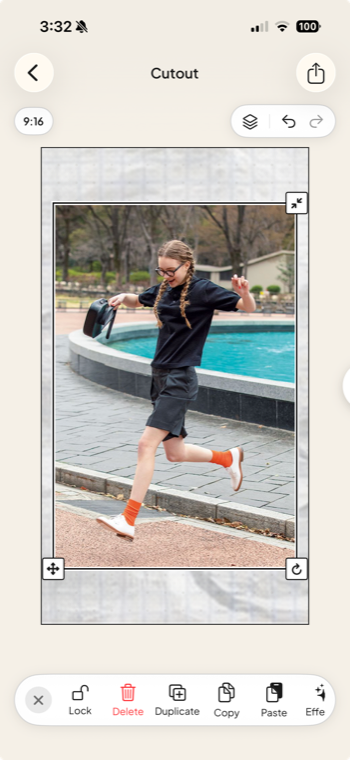
<div class="step"><div class="step-num">1</div><div class="step-text"><p><strong>Add a photo with a clear subject.</strong> Open Jodu, start a project, and drop in your photo. A subject that stands out from its background gives the cleanest cut.</p></div><figure class="step-media"><img src="/assets/blog/cutout-1-add-photo.png" alt="A photo with a clear subject placed on the Jodu canvas, ready to cut out."></figure></div>

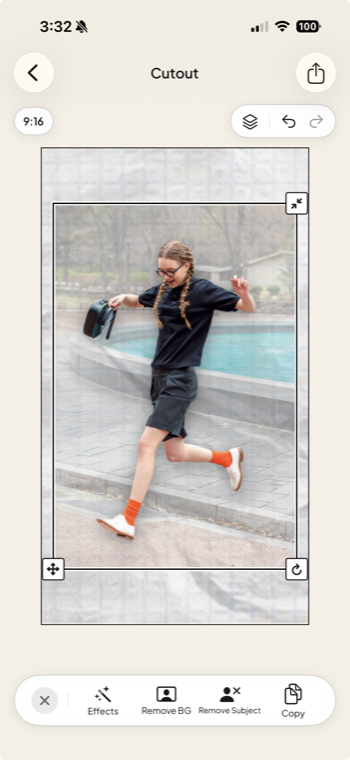
<div class="step"><div class="step-num">2</div><div class="step-text"><p><strong>Press and hold to isolate the subject.</strong> Press and hold on the photo and a toolbar pops up. Tap Remove BG, and Jodu lifts the subject off its background in about a second, all on-device.</p></div><figure class="step-media"><img src="/assets/blog/cutout-2-isolate.png" alt="Jodu's press-and-hold toolbar showing Remove BG and Remove Subject options."></figure></div>

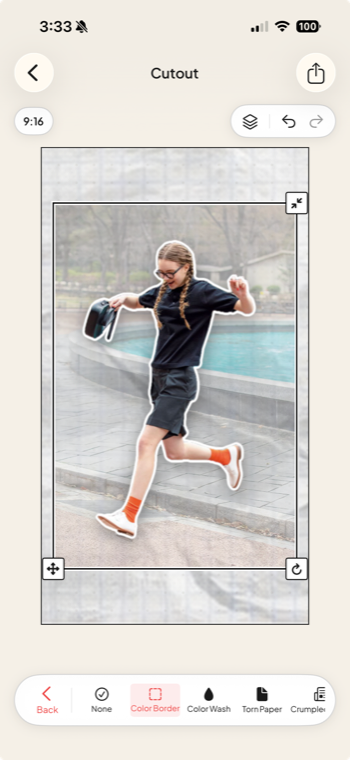
<div class="step"><div class="step-num">3</div><div class="step-text"><p><strong>Add an edge.</strong> Tap Effects and pick a look. Color Border gives a clean sticker outline, and there's also Torn Paper, Color Wash, and Crumpled.</p></div><figure class="step-media"><img src="/assets/blog/cutout-3-effects.png" alt="Jodu's Effects menu with Color Border, Color Wash, Torn Paper, and Crumpled."></figure></div>

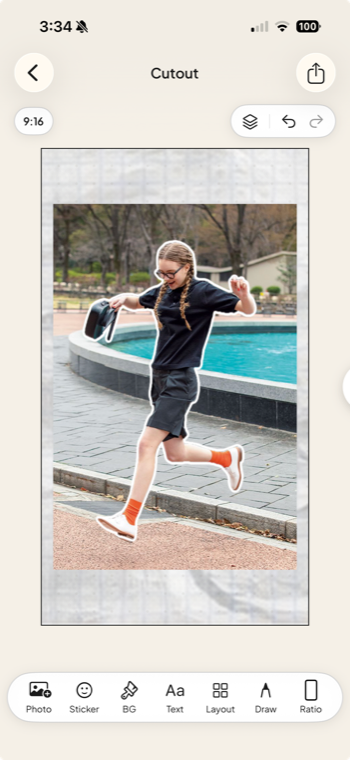
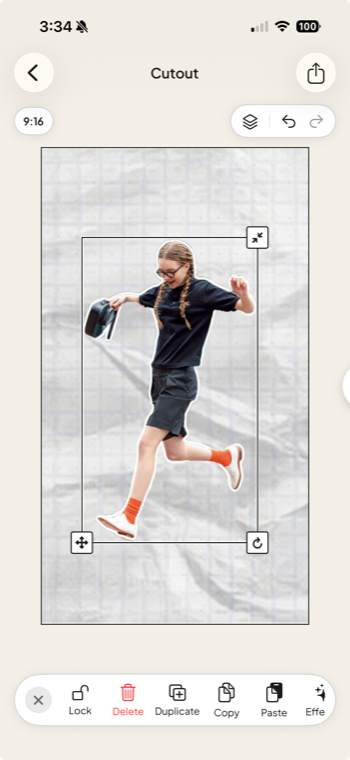
<div class="step"><div class="step-num">4</div><div class="step-text"><p><strong>Now it reads like a cut-out.</strong> The subject sits on the canvas with a crisp border, ready to move, resize, or layer with text and stickers.</p></div><figure class="step-media"><img src="/assets/blog/cutout-4-bordered.png" alt="The subject with a clean white border applied, on the canvas."></figure></div>

<div class="step"><div class="step-num">5</div><div class="step-text"><p><strong>Or remove the background completely.</strong> Want just the subject? Lift it onto a clean canvas, then drop it onto a new background or into a collage.</p></div><figure class="step-media"><img src="/assets/blog/cutout-5-removed-bg.png" alt="The subject fully isolated on a transparent canvas with the background removed."></figure></div>

</div>

When it looks right, export to your camera roll or share it straight out.

## Why on-device matters

Most free "remove background" tools online work by uploading your photo to their server, processing it there, and sending it back. That means your picture, often of a person, sits on someone else's computer for a while. Jodu runs the whole cutout on your iPhone using Apple's built-in vision models. The photo never leaves your phone, and it works with no signal.

## Getting clean edges

A few things that help the cutout come out clean:

- Pick a photo where the subject stands out from the background. More contrast makes the edge easier to find.
- Hair and fur are the hardest part for any tool. A border or torn-paper edge hides small rough spots, and it usually looks better anyway.
- If the photo has more than one subject, the cutout grabs the main one. Crop in first if you want a specific person or object.

## What to make with your cutouts

Once you can cut anything out, the fun part is using it. Cutouts are the backbone of a good collage. Turn a few into stickers, drop them over a textured background, or line them up into a [seamless Instagram carousel](/blog/panorama-instagram-carousel/). Cutouts are also the starting point for most [aesthetic collage apps](/blog/best-aesthetic-collage-apps/).

## FAQ

### Can you remove a background on iPhone for free?
Yes. iOS has subject lift built into the Photos app (iOS 16 and later), and free apps like Jodu do one-tap cutouts on-device.

### Does removing a background upload my photo anywhere?
Not with the on-device options. iOS subject lift and Jodu both run on your iPhone using Apple's vision models, so the photo never leaves your device. Many web-based removers do upload, so check before using one with personal photos.

### How do I get a transparent cutout I can reuse?
Lift the subject and place it on whatever you need. In Jodu you cut the subject out and drop it onto a new background or into a collage; iOS subject lift lets you copy the bare cutout into other apps.

### What's the best app to cut out a photo for a collage?
Jodu, if you actually want to use the cutout. It isolates the subject on-device, adds borders and torn-paper edges, and gives you a freeform canvas to build on.

<script type="application/ld+json">
{"@context":"https://schema.org","@graph":[
{"@type":"HowTo","name":"How to remove a background from a photo on iPhone","description":"Cut the subject out of a photo on iPhone for free and entirely on-device, then use it in a collage, with Jodu.","tool":{"@type":"HowToTool","name":"Jodu"},"step":[
{"@type":"HowToStep","position":1,"name":"Add a photo with a clear subject","text":"Open Jodu, start a project, and add a photo with a subject that stands out from its background."},
{"@type":"HowToStep","position":2,"name":"Press and hold to isolate the subject","text":"Press and hold on the photo, then tap Remove BG. Jodu lifts the subject off its background in about a second, on-device with no upload."},
{"@type":"HowToStep","position":3,"name":"Add an edge","text":"Tap Effects and pick a look such as Color Border, Torn Paper, Color Wash, or Crumpled, so it reads as a cut-out sticker."},
{"@type":"HowToStep","position":4,"name":"Place it and build","text":"The bordered subject sits on the canvas, ready to move, resize, or layer with new backgrounds, text, and stickers."},
{"@type":"HowToStep","position":5,"name":"Remove the background completely","text":"Or lift just the subject onto a clean canvas and drop it onto a new background or into a collage."}
]},
{"@type":"FAQPage","mainEntity":[
{"@type":"Question","name":"Can you remove a background on iPhone for free?","acceptedAnswer":{"@type":"Answer","text":"Yes. iOS has subject lift built into the Photos app (iOS 16 and later), and free apps like Jodu do one-tap cutouts on-device."}},
{"@type":"Question","name":"Does removing a background upload my photo anywhere?","acceptedAnswer":{"@type":"Answer","text":"Not with the on-device options. iOS subject lift and Jodu both run on your iPhone using Apple's vision models, so the photo never leaves your device. Many web-based removers do upload, so check before using one with personal photos."}},
{"@type":"Question","name":"How do I get a transparent cutout I can reuse?","acceptedAnswer":{"@type":"Answer","text":"Lift the subject and place it on whatever you need. In Jodu you cut the subject out and drop it onto a new background or into a collage; iOS subject lift lets you copy the bare cutout into other apps."}},
{"@type":"Question","name":"What is the best app to cut out a photo for a collage?","acceptedAnswer":{"@type":"Answer","text":"Jodu, if you want to use the cutout. It isolates the subject on-device, adds borders and torn-paper edges, and gives you a freeform canvas to build on."}}
]}
]}
</script>

---

Source: https://jodu.app/blog/remove-photo-background-iphone/

A free iPhone app with one-tap on-device cutouts. Lift a subject, add a border or torn-paper edge, and drop it straight into a collage.