# What Is a Seamless Instagram Carousel (and How to Make One)

> A plain-English guide to the carousel posts that scroll like one continuous picture. What they are, when to use one, and how to make your first.

If you spend any time on Instagram, you've swiped through a post where the picture didn't stop at the edge of the screen. It just kept going, like you were sliding a window across a wider photo. That's a seamless carousel. It looks way harder to make than it actually is, so here's the whole idea in plain terms, plus how to make your first one.

<video class="post-video" autoplay muted loop playsinline preload="metadata"><source src="/assets/blog/jodu-carousel-demo.mp4" type="video/mp4"></video>
<span class="post-video-cap">One made in Jodu, swiping in the Instagram feed.</span>

> **TL;DR** — A seamless carousel is one wide picture cut into equal slides that line up edge to edge as you swipe, so the whole post reads as a single image. The easy way: design it on one canvas in Jodu (pick the 4:5 size) and it slices the aligned slides for you.

## First, what's a carousel?

A carousel is just an Instagram post with more than one image. You tap it and swipe sideways to see the rest, up to 20 images in one post. Most carousels are a stack of separate pictures. Photo one, photo two, photo three.

A **seamless carousel** is the clever version. Instead of separate pictures, it's one wide picture cut into equal slices. When you swipe, the slices line up edge to edge, so the whole thing reads as one continuous scene panning across your screen. It's the same kind of Instagram post. It just doesn't break at the slide edges.

<!-- SCREENSHOT: side-by-side — a normal stacked carousel vs. a seamless one panning across slides. -->

## When should you use one?

Seamless carousels are worth the small bit of extra effort when:

- **You want people to keep swiping.** Because the picture clearly carries on past the first slide, people swipe to see the rest almost without thinking. That helps the post, since Instagram pays attention to how long people spend on it.
- **You've got something wide.** A landscape, a panorama, a long illustration, a before-and-after, a process shown left to right. Anything that wants more room than one square.
- **You want it to look designed.** A seamless post immediately reads as "someone made this on purpose," which is most of the battle.

If you just have a few unrelated photos to share, a normal carousel is totally fine. Seamless is for when the images belong together as one picture.

## The one thing that makes it work (or not)

Everything comes down to the **seams**, the lines where one slide ends and the next starts. If your picture lines up across them, the post feels like one image. If it's off even a little, you get a visible step where they meet, and the effect falls apart.

This is exactly why seamless carousels have a reputation for being fiddly. Done the old way, you slice one big image into perfectly equal pieces by hand and export them one at a time, in order. Get a slice slightly wrong and the whole thing looks broken.

The good news is you don't have to do any of that by hand anymore.

## How to make one on your phone

We built [Jodu](https://apps.apple.com/app/jodu-app/id6759936736) so the fiddly part disappears. You design on **one long canvas**, and Jodu cuts it into perfectly aligned slides for you when you're done. There's no slicing and no exporting one piece at a time.

<div class="steps">

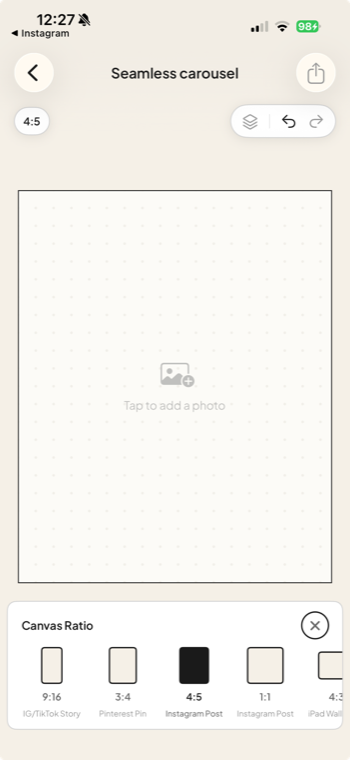
<div class="step"><div class="step-num">1</div><div class="step-text"><p><strong>Start a new project</strong> and pick the Portrait (4:5) size. That's the tall shape Instagram likes best for feed posts.</p></div><figure class="step-media"><img src="/assets/blog/step-1-canvas-ratio.png" alt="Jodu's Canvas Ratio picker with 4:5 (Instagram Post) selected."></figure></div>

<div class="step"><div class="step-num">2</div><div class="step-text"><p><strong>Add slides</strong> by tapping the + at the bottom. Each dot is one slide, so add a few to start.</p></div><figure class="step-media"><video autoplay muted loop playsinline preload="metadata"><source src="/assets/blog/step-2-add-slides.mp4" type="video/mp4"></video></figure></div>

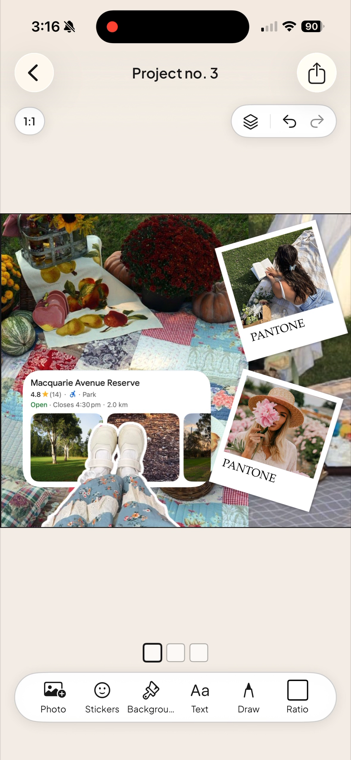
<div class="step"><div class="step-num">3</div><div class="step-text"><p><strong>Lay out your picture across the whole canvas.</strong> Drag in photos, text, and stickers, and scroll sideways. Let things cross over the slide lines. That's what makes it seamless. Helper lines snap things into place at the edges so you don't have to eyeball it.</p></div><figure class="step-media"><img src="/assets/blog/step-3-layout.png" alt="A Jodu carousel canvas with a finished collage laid out across it."></figure></div>

<div class="step"><div class="step-num">4</div><div class="step-text"><p><strong>Export.</strong> Jodu renders every slide in high resolution and shows you a swipe-through preview so you can check the seams line up. Then tap Save All to drop them in your camera roll.</p></div><figure class="step-media"><video autoplay muted loop playsinline preload="metadata"><source src="/assets/blog/step-6-export.mp4" type="video/mp4"></video></figure></div>

<div class="step"><div class="step-num">5</div><div class="step-text"><p><strong>Post to Instagram.</strong> Make a new post, pick your slides in order (first one first), keep them all the same shape, and share.</p></div></div>

</div>

That's a finished seamless carousel, and you never touched a pair of scissors.

<div class="cta-inline"><span class="lead">Try it yourself</span><a class="btn-download" href="https://apps.apple.com/app/jodu-app/id6759936736" target="_blank" rel="noopener"><svg viewBox="0 0 24 24" aria-hidden="true"><path d="M17.05 12.04c-.03-2.8 2.28-4.15 2.38-4.21-1.3-1.9-3.32-2.16-4.04-2.19-1.72-.17-3.36 1.01-4.23 1.01-.88 0-2.22-.99-3.65-.96-1.88.03-3.61 1.09-4.58 2.77-1.95 3.38-.5 8.39 1.4 11.15.93 1.35 2.04 2.86 3.49 2.81 1.4-.06 1.93-.91 3.63-.91 1.69 0 2.17.91 3.66.88 1.51-.03 2.47-1.38 3.39-2.74 1.07-1.57 1.51-3.09 1.53-3.17-.03-.01-2.94-1.13-2.98-4.44zM14.5 4.07c.76-.93 1.28-2.21 1.14-3.49-1.1.05-2.45.74-3.24 1.66-.71.81-1.33 2.12-1.16 3.37 1.23.1 2.49-.62 3.26-1.54z"/></svg> Download Jodu free</a></div>

## Where to go next

Want to make one that really lands, not just one that lines up? Our [guide to panorama carousels](/blog/panorama-instagram-carousel/) covers the storytelling side: hooks, seam reveals, and holding one scene together. And if you want exact pixel sizes and margins, there's the [dimensions and grid math](/blog/instagram-carousel-dimensions/). Starting from photos? Here's how to [remove a photo background on iPhone](/blog/remove-photo-background-iphone/) for the cut-outs that go into your carousel.

## FAQ

### What is a seamless Instagram carousel?
It's a carousel post where one wide picture is cut into equal slices, one per slide. As you swipe, the slices line up edge to edge, so the whole post reads as a single continuous scene instead of separate photos.

### How many photos can a carousel have?
Up to 20 images in a single Instagram post.

### What size should the slides be?
4:5 portrait (1080 × 1350 px) works best for the feed. All slides need to be the same shape, since Instagram uses the first slide's aspect ratio for the whole post.

### Do I need Photoshop to make one?
No. Apps like Jodu let you design the whole thing on one canvas and export the aligned slides for you, so there's no manual slicing or background-removal step.

<script type="application/ld+json">
{"@context":"https://schema.org","@graph":[
{"@type":"HowTo","name":"How to make a seamless Instagram carousel","description":"Make a seamless Instagram carousel, a post that scrolls like one continuous picture, by designing on a single canvas in Jodu.","tool":{"@type":"HowToTool","name":"Jodu"},"step":[
{"@type":"HowToStep","position":1,"name":"Start a project and pick 4:5","text":"Open Jodu, start a new project and pick the Portrait (4:5) size that Instagram likes best for feed posts."},
{"@type":"HowToStep","position":2,"name":"Add slides","text":"Tap the + at the bottom to add slides; each dot is one slide."},
{"@type":"HowToStep","position":3,"name":"Lay out your picture across the canvas","text":"Drag in photos, text and stickers and let them cross the slide lines so the picture stays continuous."},
{"@type":"HowToStep","position":4,"name":"Export","text":"Export, check the swipe-through preview that the seams line up, then tap Save All to your camera roll."},
{"@type":"HowToStep","position":5,"name":"Post to Instagram","text":"Make a new Instagram post, pick the slides in order, keep them all the same shape, and share."}
]},
{"@type":"FAQPage","mainEntity":[
{"@type":"Question","name":"What is a seamless Instagram carousel?","acceptedAnswer":{"@type":"Answer","text":"A carousel post where one wide picture is cut into equal slices, one per slide. As you swipe, the slices line up edge to edge, so the whole post reads as a single continuous scene."}},
{"@type":"Question","name":"How many photos can a carousel have?","acceptedAnswer":{"@type":"Answer","text":"Up to 20 images in a single Instagram post."}},
{"@type":"Question","name":"What size should the slides be?","acceptedAnswer":{"@type":"Answer","text":"4:5 portrait, 1080 by 1350 px, works best for the feed. All slides must be the same shape because Instagram uses the first slide's aspect ratio for the whole post."}},
{"@type":"Question","name":"Do I need Photoshop to make one?","acceptedAnswer":{"@type":"Answer","text":"No. Apps like Jodu let you design the whole thing on one canvas and export the aligned slides for you, with no manual slicing."}}
]},
{"@type":"VideoObject","name":"A seamless Instagram carousel made in Jodu","description":"A seamless carousel made in Jodu, swiping across slides as one continuous image in the Instagram feed.","thumbnailUrl":"https://jodu.app/assets/blog/jodu-carousel-demo.jpg","contentUrl":"https://jodu.app/assets/blog/jodu-carousel-demo.mp4","uploadDate":"2026-05-20T08:00:00+00:00","duration":"PT12S"}
]}
</script>

---

Source: https://jodu.app/blog/seamless-instagram-carousel/

A free iPhone collage app with a built-in carousel canvas. Design on one canvas and it slices the aligned slides for you, no Photoshop needed.